Can WordBoard Type Bold Text, Links Or Formatting?
Yes. A WordBoard key can hold formatted text: bold, italics, underline, strikethrough, clickable links and bulleted lists.
Make a formatted key
- On the Keys tab tap + and choose Custom Key, or open a key you already have.
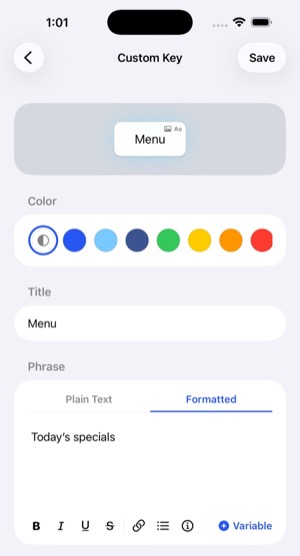
- Under Phrase, tap Formatted.
- Type your text and use the toolbar to add bold, italics, underline, strikethrough, links and bullets. Variables work here too.
- Tap Save.
Use it
Apple only lets keyboards type plain text, so a formatted key is copied for you to paste:
- Tap the key in the WordBoard keyboard. You'll see "Formatted text copied, paste away!"
- Touch and hold in the text field and tap Paste.
Formatted keys show a small Aa in the top corner of the key, so you can tell them apart from keys that type straight away. More about key icons.
Where the formatting shows
- Mail, Notes, Messages, Gmail, Outlook and most email apps keep the formatting.
- In Messages, links show as the text with the web address after it in brackets.
- WhatsApp and Messenger paste it as plain text.
Tips
- Want plain text just this once? Touch and hold the key in the keyboard and choose Type as Plain Text.
- To stop a key being formatted, switch its Phrase back to Plain Text. WordBoard checks with you first, because the styles are removed.
- A formatted key can have a photo too. Tapping it copies the text and the photo together.
- The Preview tab in the app shows formatted keys the way they'll look when pasted.