What Do The Icons On My WordBoard Keys Mean?
Some WordBoard keys do more than type. A small icon on the key tells you what happens when you tap it.
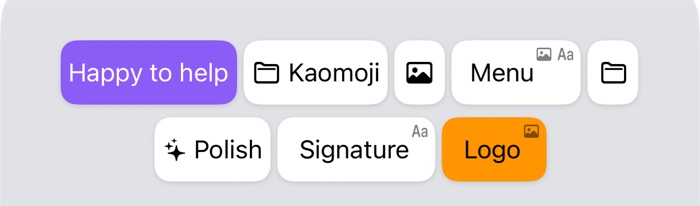
- Folder icon before the name: opens a folder of keys.
- Sparkles before the name: an AI Key that rewrites, translates or summarises text with Apple Intelligence.
- Photo badge in the top corner: the key copies a photo or GIF for you to paste.
- Aa badge in the top corner: the key copies formatted text, such as bold text or links, for you to paste.
- Both badges: the key copies formatted text and a photo together.
- Photo icon in the middle: a photo key with no title or text.
Keys without an icon type their text straight away.
Why some keys copy instead of type
Apple only lets keyboards type plain text, so keys with a photo or formatted text are copied to the clipboard instead. After tapping one, touch and hold where you want it and tap Paste.
Good to know
- The key editor shows a preview of the key at the top, with the same icons, so you can see how it will look before you save.
- With VoiceOver, folders, AI keys and photo keys are read out with what they do.